
TL;DR — Without an identity layer, AI agents accessing enterprise tools create real exposure: data exfiltration through unscoped access, audit failures when no one can trace which user authorized which tool call, and lateral movement when a compromised agent inherits a service account's permissions. This post shows how to deploy an identity gateway with OPA policy and OAuth 2.0 token exchange (RFC 8693) between Claude and your MCP servers — and walks through connecting Claude to it. The result: per-tool scoped tokens with five-second TTLs, delegation chains that trace every action back to the authorizing human, and authorization policy managed as code in git. Clone the example project, run make up, connect Claude, and see it work.
You connected Claude to an MCP server last week. Took about three minutes. claude mcp add, point it at a URL, maybe paste an API key into an environment variable. Tools appeared. Claude started calling them. You shipped a demo and moved on.
Here is the question nobody in that room asked: who authorized that tool call? Not "who clicked Approve in the chat window." I mean: what system verified the identity of the user behind the agent, checked their permissions against a policy, minted a scoped token for just that operation, and logged the entire chain of custody so you could reconstruct it six months from now when compliance asks?
If the answer is "nobody," you have a problem. And it is a bigger problem than you think, because the MCP specification changed. As of the 2025-03-26 spec revision, MCP servers are formally OAuth 2.0 Resource Servers. The spec references RFC 9728 (Protected Resource Metadata) directly. Your MCP server is supposed to publish a /.well-known/oauth-protected-resource document, validate bearer tokens, and enforce audience restrictions. The protocol told us what MCP servers are. Most of the ecosystem has not caught up.
Clutch Security found that 43% of MCP servers they tested have OAuth implementation flaws. OWASP released a practical guide for secure MCP server development. CoSAI published an extensive security taxonomy for MCP. The gap between what the spec says and what developers actually deploy is wide enough to drive a breach through.
I wrote about why this matters in The Agentic Virus. If an agent can be the attack vector — and it can, through prompt injection, tool poisoning, and lateral movement across MCP connections — then the identity layer between agents and tools is not optional.
So let's build one. We will deploy an identity gateway between Claude and a set of MCP servers, connect Claude to it, and walk the config that makes it work — from the OAuth topology to the OPA policies to the token exchange flow. Everything runs in Docker. Everything is code in a git repo.
What "Resource Server" Actually Means
If you have built or consumed a REST API in the last decade, you already know this pattern. You just might not have mapped it onto MCP yet.
A Resource Server, in OAuth 2.0 terms, is a server that hosts protected resources and validates access tokens to authorize requests. Your backend API sitting behind an API gateway is a resource server. It receives a JWT in the Authorization header, validates the signature against the authorization server's JWKS, checks the aud claim to make sure the token was issued for this specific API, reads the scope claim to determine what operations the caller is allowed to perform, and either serves the request or returns a 403.
RFC 9728 adds a discovery mechanism: the resource server publishes a /.well-known/oauth-protected-resource document that tells clients which authorization server(s) to use, what scopes are available, and how tokens should be obtained. This is the same pattern as OpenID Connect Discovery, but for resource servers instead of identity providers.
The MCP spec adopted this directly. An MCP server that supports authorization is expected to publish Protected Resource Metadata at its well-known endpoint. Clients like Claude can discover it, find the authorization server, obtain tokens through standard OAuth 2.0 flows, and present those tokens on every MCP request.
Now look at how most MCP servers are deployed today:
- No delegation chain. The user's identity is not propagated to downstream services. The MCP server calls backends with its own service account, or worse, with a static API key.
- No per-tool scoping. Every authenticated user can call every tool. There is no mechanism to say "this user can list accounts but cannot read PII."
- No audience restrictions. Tokens are accepted without checking who they were issued for.
- No audit trail. There is no record of which user, through which agent, called which tool, with what authorization, at what time.
If your backend API would not accept a static API key with god-mode access, why does your MCP server?
The Architecture That Follows
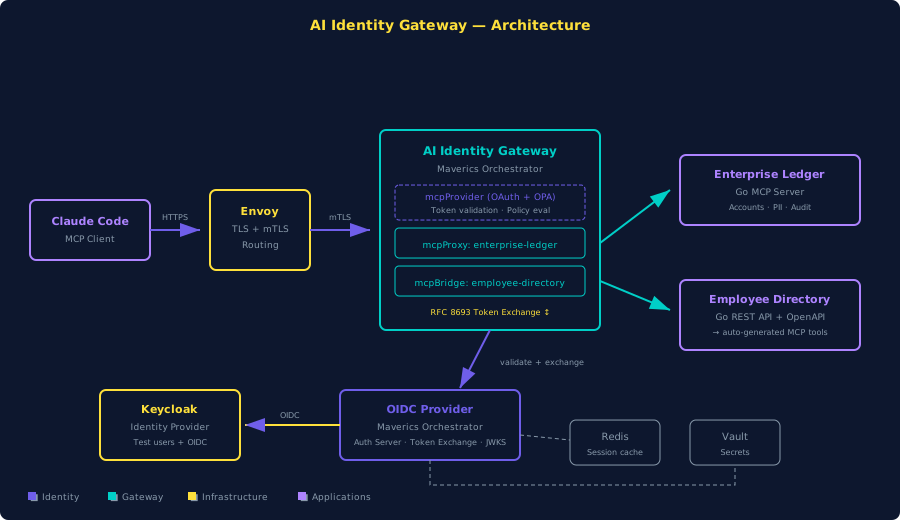
If your MCP server is a resource server, the architecture writes itself. You need three things:
-
An Authorization Server. Something that issues OAuth 2.0 tokens, performs token exchange (RFC 8693), and publishes discovery metadata.
-
An Identity Gateway. This sits in front of your MCP servers. It validates inbound tokens from agents, evaluates fine-grained policies, and mints delegation tokens via RFC 8693 token exchange to pass downstream. The delegation token carries the user's identity, the gateway's identity as the acting party, and a scope restricted to exactly the operation being performed.
-
A Policy Engine. OPA (Open Policy Agent) is the natural choice here. You write Rego policies that inspect the inbound token's claims and the tool being called, and the policy engine returns allow or deny with a reason. These policies live in files. Files live in git repos. Git repos have pull requests and code review.
What makes this work in practice: tool-scoped delegation tokens with short TTLs. When Claude calls listAccounts through the gateway, the gateway does not forward Claude's original access token to the backend. It exchanges that token for a new one — a delegation token scoped to ledger:ListAccounts, audience-restricted to the enterprise ledger service, with a five-second TTL. If that token leaks, the blast radius is one operation on one service for five seconds.
The Stack
I put together an example project that implements this architecture end-to-end. Everything runs in Docker containers.
The stack:
- Keycloak — The identity provider. Holds test users with passwords. Issues tokens to the authorization server when users authenticate.
- OIDC Provider (Maverics Orchestrator) — The OAuth 2.0 authorization server. Registers OAuth clients, issues access tokens, and performs RFC 8693 token exchange.
- AI Identity Gateway (Maverics Orchestrator) — The MCP gateway. A second Maverics Orchestrator instance running an mcpProvider with full OAuth enforcement.
- Enterprise Ledger (via mcpProxy) — A Go MCP server with tiered data.
- Employee Directory (via mcpBridge) — A Go REST API with JWT authentication and an OpenAPI spec.
- Envoy — TLS termination and hostname-based routing.
- Redis — Session and token cache.
- Vault — Secret storage.
Get the Example
git clone https://github.com/nickgamb-strata/connect-claude-to-maverics.gitInstall Prerequisites:
- Docker Desktop (or Docker Engine + Compose v2)
- mkcert — local TLS certificate generation:
brew install mkcert - Node.js — required for mcp-remote:
brew install node - Maverics Orchestrator image from Strata
Start the Stack:
make init   # Generate TLS certs, OIDC signing keys, configure local DNS
make up     # Docker Compose up — builds and starts all containers
make smoke-test  # Verify everything is healthy
Walk the Config
Four files define the entire identity layer.
Keycloak: The Identity Provider
The Keycloak realm ships with two test users:
- john.mcclane — password:
yippiekayay - sarah.connor — password:
judgmentday
OIDC Provider: The Authorization Server
The connector tells the OIDC Provider how to federate to Keycloak:
connectors:
  - name: keycloak
    type: oidc
    oidcWellKnownURL: https://keycloak.orchestrator.lab:8443/realms/blueprints/.well-known/openid-configuration
    oauthClientID: ai-identity-gateway-oidc
    oauthClientSecret: <ai_identity_gateway.keycloak_client_secret>
The public client for Claude Code:
apps:
  - name: mcp-client-cli
    type: oidc
    clientID: mcp-client-cli
    public: true
    redirectURLs:
      - http://localhost:19876/callback
      - http://127.0.0.1:19876/callback
    authentication:
      idps:
        - keycloak
    accessToken:
      type: jwt
      allowedAudiences:
        - https://gateway.orchestrator.lab/
      customScopes:
        scopes:
          - name: pii:read
          - name: audit:read
      claimsMapping:
        email: keycloak.email
        name: keycloak.email
The gateway client for token exchange:
  - name: ai-identity-gateway
    type: oidc
    clientID: ai-identity-gateway
    credentials:
      secrets:
        - <ai_identity_gateway.oidc_client_secret>
    grantTypes:
      - client_credentials
      - urn:ietf:params:oauth:grant-type:token-exchange
    accessToken:
      type: jwt
      allowedAudiences:
        - https://employee-directory.orchestrator.lab/
        - https://enterprise-ledger.orchestrator.lab/
      customScopes:
        scopes:
          - name: ledger:ListAccounts
          - name: ledger:GetAccount
          - name: ledger:ListTransactions
          - name: ledger:UpdateAccount
          - name: ledger:ReadPII
          - name: ledger:ReadAudit
          - name: employee:List
          - name: employee:Get
Gateway: The MCP Provider
mcpProvider:
  enabled: true
  transports:
    stream:
      enabled: true
      path: "/mcp"
      session:
        enabled: true
        headerName: "Mcp-Session-Id"
        timeout: 1h
  authorization:
    oauth:
      enabled: true
      metadataPath: /.well-known/oauth-protected-resource
      servers:
        - wellKnownEndpoint: https://auth.orchestrator.lab/.well-known/oauth-authorization-server
          tokenValidation:
            expectedAudiences:
              - https://gateway.orchestrator.lab/
            method: jwt
Enterprise Ledger proxy:
  - name: enterprise-ledger-proxy
    type: mcpProxy
    toolNamespace:
      disabled: false
      name: enterprise_ledger_
    upstream:
      transport: stream
        stream:
          url: http://enterprise-ledger:8080/mcp
    authorization:
      inbound:
        opa:
          name: enterprise-ledger-inbound-authz
          file: /etc/maverics/policies/enterprise-ledger-inbound-authz.rego
      outbound:
        type: tokenExchange
        tokenExchange:
          type: delegation
          idp: oidc-provider
          audience: https://enterprise-ledger.orchestrator.lab/
          tools:
            - name: listAccounts
              ttl: 5s
              scopes:
                - name: ledger:ListAccounts
OPA Policy: Per-Tool Authorization
package orchestrator

default result["allowed"] := true

jwt_payload := payload if {
    auth_header := input.request.http.headers.Authorization
    startswith(auth_header, "Bearer ")
    token := substring(auth_header, 7, -1)
    [_, payload, _] := io.jwt.decode(token)
}

result["allowed"] := false if {
    input.request.mcp.tool.params.name == "getCustomerPII"
    not contains(jwt_payload.scope, "pii:read")
}

result["external_message"] := "Access denied: PII access requires pii:read scope." if {
    input.request.mcp.tool.params.name == "getCustomerPII"
    not contains(jwt_payload.scope, "pii:read")
}

result["allowed"] := false if {
    input.request.mcp.tool.params.name == "getAuditLog"
    not contains(jwt_payload.scope, "audit:read")
}

result["external_message"] := "Insufficient privileges: audit log access requires audit:read scope." if {
    input.request.mcp.tool.params.name == "getAuditLog"
    not contains(jwt_payload.scope, "audit:read")
}
Connecting Claude
With the stack running, connecting Claude is one command:
claude mcp add --transport http \
  --client-id mcp-client-cli \
  --callback-port 19876 \
  ai-identity-gateway \
  https://gateway.orchestrator.lab/mcp
For Claude Desktop, add via mcp-remote in claude_desktop_config.json:
{
  "mcpServers": {
    "ai-identity-gateway": {
      "command": "/opt/homebrew/bin/npx",
      "args": [
        "mcp-remote",
        "https://gateway.orchestrator.lab/mcp",
        "3334",
        "--transport", "http-only",
        "--static-oauth-client-info",
        "{\"client_id\":\"mcp-client-cli\"}"
      ],
      "env": {
        "NODE_EXTRA_CA_CERTS": "/path/to/connect-claude-to-maverics/certs/rootCA.pem"
      }
    }
  }
}
When Claude connects, the OAuth discovery, authentication, and token issuance flow completes automatically. Claude discovers available tools with namespace prefixes:
enterprise_ledger_listAccounts
enterprise_ledger_getAccount
enterprise_ledger_getTransactions
enterprise_ledger_updateAccountStatus
enterprise_ledger_getCustomerPII
enterprise_ledger_getAuditLog
employee_directory_listEmployees
employee_directory_getEmployee
employee_directory_listDepartments
employee_directory_createEmployee
When you ask Claude to list accounts, the gateway validates the token, OPA evaluates the policy (allowed), the gateway exchanges the token for a delegation token scoped to ledger:ListAccounts with a five-second TTL, and the Enterprise Ledger receives the request.
When you ask Claude to show PII for a customer, OPA checks for pii:read in the token's scope. If it's not there, OPA returns: "Access denied: PII access requires pii:read scope." Claude gets the denial message and relays it. The Enterprise Ledger never saw the request.
The Audit Trail
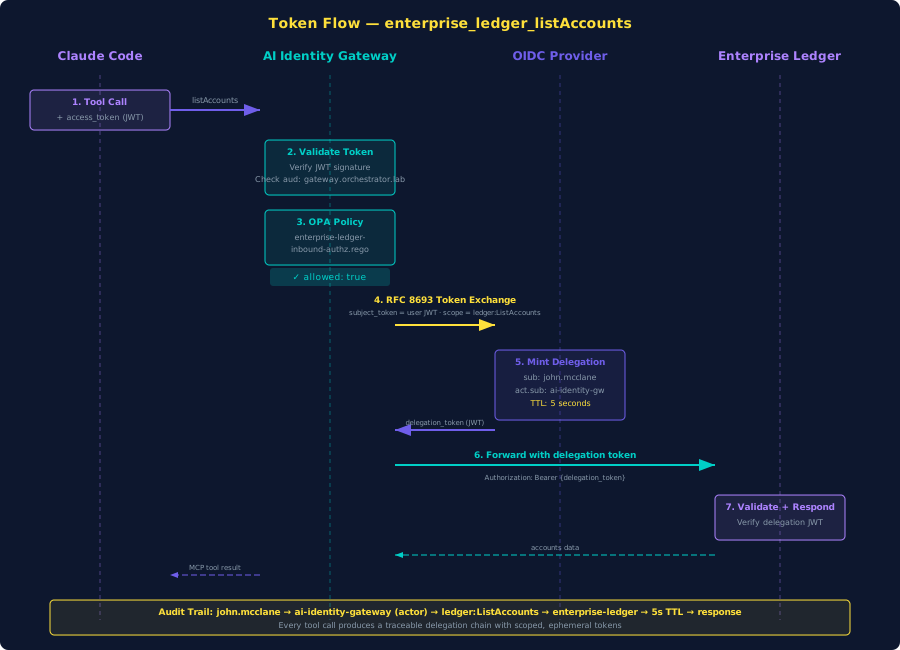
Every tool call produces an auditable delegation chain:
- User's access token arrives at the gateway. Sub:
john.mcclane@orchestrator.lab. Aud:https://gateway.orchestrator.lab/. - OPA inbound policy evaluates. Returns allowed: true for
listAccounts. - RFC 8693 token exchange. Gateway requests a delegation token for the enterprise ledger.
- Delegation token contents:
sub:john.mcclane@orchestrator.lab— the original useract.sub:ai-identity-gateway— the gateway as acting partyscope:ledger:ListAccounts— just this one operationaud:https://enterprise-ledger.orchestrator.lab/— just this one service- TTL: 5 seconds
The five-second TTL means even if a delegation token leaks, the exposure window is measured in seconds, not hours.
The act claim (RFC 8693 Section 4.4) tells the Enterprise Ledger the request is coming from the gateway on behalf of john.mcclane@orchestrator.lab.
Managing It as Code
What does a policy change actually look like? Say you want to restrict getTransactions so it requires a new ledger:ViewTransactions scope.
Two files change. The Rego policy gets a new rule:
result["allowed"] := false if {
    input.request.mcp.tool.params.name == "getTransactions"
    not contains(jwt_payload.scope, "ledger:ViewTransactions")
}
The OIDC Provider's maverics.yaml adds the new scope:
customScopes:
  scopes:
    - name: pii:read
    - name: audit:read
    - name: ledger:ViewTransactions
That is the diff. Two files. Commit, PR, review, merge, auto-redeploy.
What's Next
The example project covers the fundamentals: OAuth token validation, OPA policy evaluation, RFC 8693 delegation tokens, and per-tool scoping. The Maverics platform extends this with:
- Identity Continuity — Automatic IdP failover with zero agent downtime.
- Step-Up Authentication — Passwordless biometric verification for sensitive tool calls via FIDO2.
- Observability — Real-time topology visualization of MCP connections, traffic flows, and audit logs.
Further Reading
Strata Docs
Strata Blog
Industry References
- MCP Security Best Practices — Model Context Protocol
- OWASP: A Practical Guide for Secure MCP Server Development
- CoSAI MCP Security Taxonomy — OASIS Open