
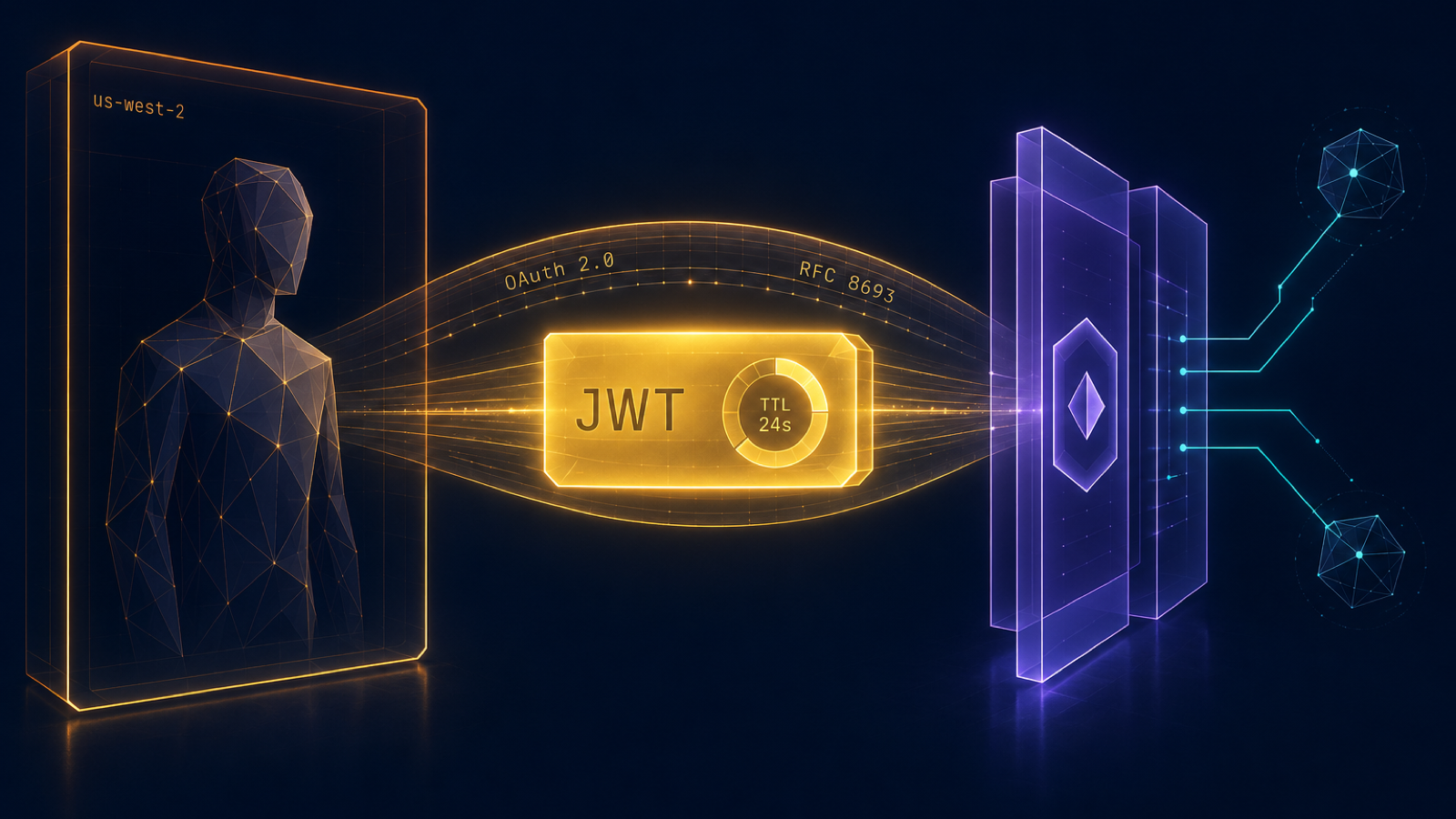
TL;DR. A year ago Anthropic's MCP spec was a curiosity. Today it is the default integration surface for agent tools. AWS shipped Bedrock AgentCore at re:Invent 2025 with native MCP client support. This post takes the Maverics AI Identity Gateway lab from the prior tutorial, exposes it over a Cloudflare Tunnel, and wires a Bedrock AgentCore agent to it through OAuth 2.0 Authorization Code with PKCE. End-user identity flows through the agent, into the gateway, and onto every audit line. Backends, OPA policies, and Maverics' OAuth posture do not change. Different agent client, same gateway. Clone the companion repo, follow the steps below, and watch the delegation chain.
What Changed in the Agent Ecosystem
Three things lined up over the last twelve months that make this story straightforward.
First, the MCP spec settled the auth question. As of the 2025-03-26 revision, an MCP server publishes Protected Resource Metadata at /.well-known/oauth-protected-resource per RFC 9728. Clients fetch the metadata, learn which authorization servers issue tokens for the resource, run a standard OAuth 2.0 flow, and present a bearer token on every MCP request. No bespoke handshake. No vendor SDK. Standard OAuth.
Second, AWS shipped Bedrock AgentCore Gateway with native MCP client support. AgentCore Gateway speaks MCP over Streamable HTTP (SSE was deprecated in May 2025), fetches Protected Resource Metadata, and supports three auth flows out of the box: 3LO Authorization Code with PKCE, 2LO Client Credentials, and IAM SigV4 for AWS-native services. Targets are created with a few aws bedrock-agentcore-control calls.
Third, the rest of the ecosystem followed. The OpenAI Agents SDK supports MCP. LangChain has langchain-mcp-adapters. Google Vertex announced MCP support. Anthropic's API attaches MCP servers directly. The agent does not define the security model. The resource server and the authorization server do.
That last point is the one that pays off. If the security boundary is the gateway in front of MCP traffic, swapping agent ecosystems is a config change, not an architecture change.
What an Identity-Governed Agent Looks Like
The prior post walked through the topology in detail. The short version, since it does not change here:
- An Identity Gateway sits in front of every MCP server. It enforces inbound authorization policy (who can call which tool with which scopes) and forwards allowed calls to the upstream MCP backend.
- An Authorization Server issues tokens. For inbound calls the gateway verifies the user's access token. For outbound calls to backends the gateway exchanges that user token for a delegation token via RFC 8693, with the user as
suband the agent as theactclaim. - A policy engine (OPA in our lab) is the per-tool authorization control point. Policies live in Rego files in a git repo. Pull requests, code review, audit by diff.
- Per-tool delegation tokens with short TTLs. A leaked token is exposure for one operation on one backend for five seconds.
This pattern was originally written up around Claude Code. Nothing about it is Claude-specific. The gateway sees an OAuth bearer token and an MCP request, whatever produced that request.
The Two Things That Change
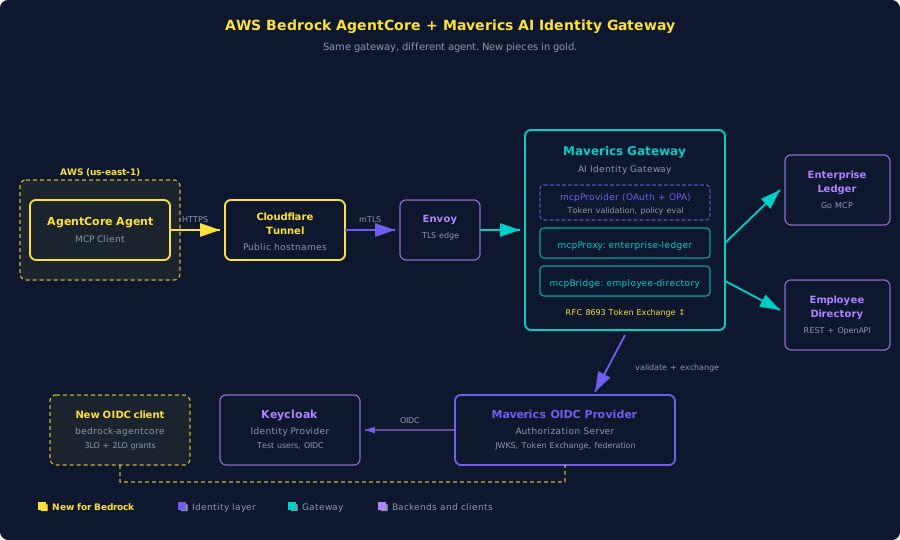
Most of the lab from the prior tutorial is unchanged: Enterprise Ledger MCP server, Employee Directory MCP bridge, OPA policies, Keycloak, the OIDC Provider, the gateway. The Bedrock variant changes exactly two things.
- Add a new OAuth client. Claude Code is a public client using PKCE because a CLI cannot keep a secret. AgentCore is a confidential client. It holds a
client_idplus aclient_secret(3LO) or uses Client Credentials with no end user (2LO). We register a newbedrock-agentcoreOIDC app in the Maverics OIDC Provider with both grant types enabled. - Reach Maverics from the public internet. AgentCore runs in AWS. The lab runs on
localhost. We expose the gateway and the OIDC Provider over HTTPS via Cloudflare Tunnel. Onecloudflaredprocess on the same machine as the lab. Two public hostnames. Free tier.
Everything else stays the same. The gateway was built to validate bearer tokens against an authorization server and run OPA policies on every tool call. It does not care which agent client produced the call.
Prerequisites
- Docker Desktop or Docker Engine + Compose v2.
- mkcert for local TLS.
- jq, AWS CLI v2, and cloudflared. On macOS:
brew install awscli cloudflared jq. - A Maverics Orchestrator image from Strata loaded via
docker load. - An AWS account. New accounts get $200 in starter credits across the first months. A payment method is required.
- A Cloudflare account (free tier) with a domain you control.
Get the Example
The companion repo is a fork of the prior connect-claude-to-maverics lab with the two changes above already applied.
git clone https://github.com/nickgamb-strata/connect-aws-bedrock-to-maverics.git
cd connect-aws-bedrock-to-maverics

cp .env.example .env
# Edit .env:
#   MAVERICS_IMAGE=<the tag you loaded via docker load>
#   AWS_REGION=us-west-2          (or any AgentCore-GA region)
Bring up the local lab:
make init       # generates TLS certs and configures local DNS
make up
make smoke-test
make smoke-test checks four things and should print four OK lines: Keycloak health, OIDC Provider discovery, gateway requires auth, and Protected Resource Metadata served. If any fail, give Keycloak another twenty seconds and retry.
Walk the Config Delta
Two files differ from the prior tutorial.
The new OAuth client
orchestrator/oidc-provider/maverics.yaml adds a bedrock-agentcore confidential client alongside the existing mcp-client-cli (kept so Claude Code still works against the same lab):
- name: bedrock-agentcore
  type: oidc
  clientID: bedrock-agentcore
  credentials:
    secrets:
      - <bedrock_agentcore.client_secret>
  authentication:
    idps:
      - keycloak
  grantTypes:
    - authorization_code
    - refresh_token
    - client_credentials
  redirectURLs:
    # Replaced after `aws bedrock-agentcore-control create-oauth2-credential-provider`
    # returns a callback URL.
    - https://bedrock-agentcore.us-east-1.amazonaws.com/oauth2/callback
  accessToken:
    type: jwt
  allowedAudiences:
    - https://gateway.orchestrator.lab/
    - https://gateway.example.com/
  customScopes:
    scopes:
      - name: pii:read
      - name: audit:read
Both grant types are enabled on the same client so the same OIDC app supports the 3LO walkthrough and the 2LO sidebar. allowedAudiences lists the lab hostname and the public Cloudflare Tunnel hostname so AgentCore-issued tokens validate.
The gateway accepts the public audience
orchestrator/ai-identity-gateway/maverics.yaml adds the public hostname to expectedAudiences:
authorization:
  oauth:
    enabled: true
    metadataPath: /.well-known/oauth-protected-resource
    servers:
      - wellKnownEndpoint: https://auth.orchestrator.lab/.well-known/oauth-authorization-server
        tokenValidation:
          expectedAudiences:
            - https://gateway.orchestrator.lab/
            - https://gateway.example.com/
          method: jwt
That is it for the Maverics side. The OPA policies, the backends, the Vault secrets, the Envoy and DNS pieces are unchanged from the prior tutorial.
The Cloudflare Tunnel
AgentCore runs in AWS. Maverics runs on your laptop. A Cloudflare Tunnel bridges the two over HTTPS without opening any inbound ports.
Log in once and create a tunnel:
cloudflared tunnel login                # opens browser, authorizes a Cloudflare zone
cloudflared tunnel create maverics-lab  # writes ~/.cloudflared/<id>.json
cloudflared tunnel list                 # note the tunnel id
Add DNS records for two hostnames you control:
cloudflared tunnel route dns maverics-lab auth.<your-domain>
cloudflared tunnel route dns maverics-lab gateway.<your-domain>
Copy the tunnel template into place and fill it in:
cp cloudflared/config.yml.template cloudflared/config.ymlThe template routes both hostnames to the local Envoy edge proxy on port 443 and rewrites the host header so Envoy's hostname-based routing works:
ingress:
  - hostname: auth.example.com
    service: https://localhost:443
    originRequest:
      httpHostHeader: auth.orchestrator.lab
      noTLSVerify: true

  - hostname: gateway.example.com
    service: https://localhost:443
    originRequest:
      httpHostHeader: gateway.orchestrator.lab
      noTLSVerify: true

  - service: http_status:404
Replace auth.example.com and gateway.example.com with your real hostnames and set the tunnel id and credentials path.
Update .env:
BEDROCK_GATEWAY_HOSTNAME=gateway.<your-domain>
BEDROCK_AUTH_HOSTNAME=auth.<your-domain>
Update both Maverics YAML files to swap gateway.example.com and auth.example.com for the same real hostnames, then restart the orchestrator containers:
docker compose restart oidc-config-merge oidc-provider ai-identity-gatewayRun the tunnel in a second terminal:
make tunnelVerify from outside the lab:
curl -s https://auth.<your-domain>/.well-known/oauth-authorization-server | jq .issuer
# "https://auth.orchestrator.lab"
The issuer is the lab hostname even though you are reaching it over a public DNS name. That is fine for the federation Maverics needs and matches the JWT iss value AgentCore will see.
AWS Account Setup
If you already have AWS configured, skip ahead. If not:
- Sign up at aws.amazon.com and add a payment method.
- In the console, switch to us-west-2 (top right region selector). Bedrock AgentCore is GA in eight regions; the tutorial uses us-west-2.
- In IAM > Users, create a non-root user named
maverics-tutorialwith Programmatic access. - Attach the policy from
aws/iam-policy.jsonin the repo as an inline policy on the user. It grantsbedrock-agentcore:*,bedrock:InvokeModel*, scoped Secrets Manager access on thebedrock-agentcore-*prefix, andiam:PassRolefor the gateway's execution role. - Generate an access key for the user.
- Configure the AWS CLI:
aws configure # AWS Access Key ID: <your key> # AWS Secret Access Key: <your secret> # Default region: us-west-2 # Default output: json - Bedrock model access. AWS retired the Model access page; serverless foundation models are auto-enabled on first invoke. The first time you invoke an Anthropic model the console may ask for a one-time use case form. Quickly verify access from the CLI:
You should see entries like
aws bedrock list-inference-profiles --region us-west-2 --type-equals SYSTEM_DEFINED \ --query "inferenceProfileSummaries[?contains(inferenceProfileId, 'sonnet-4-5') || contains(inferenceProfileId, 'haiku-4-5')].inferenceProfileId" \ --output textus.anthropic.claude-sonnet-4-5-20250929-v1:0. Modern Anthropic models on Bedrock are accessed via cross-region inference profiles, not direct model IDs. The tutorial uses Claude Sonnet 4.5 (Haiku 4.5 for cheaper runs).
Cost note. Claude Sonnet 4.5 on Bedrock is roughly $3 per million input tokens and $15 per million output tokens; Haiku 4.5 is about a tenth of that. A short demo session of a hundred tool calls is well under a dollar on Sonnet. AgentCore agents do internal LLM calls for planning, so a single user prompt can spawn five or more model invocations. Run make agentcore-down when done so you stop paying for the gateway and target.
Bootstrap the Gateway IAM Role
AgentCore Gateways assume an IAM role to log, invoke models, and read OAuth secrets. The repo ships the trust policy and a least-privilege role policy. One make target creates both:
source .env
make agentcore-bootstrap
The script runs:
aws iam create-role \
  --role-name bedrock-agentcore-maverics-role \
  --assume-role-policy-document file://aws/gateway-trust-policy.json
aws iam put-role-policy \
  --role-name bedrock-agentcore-maverics-role \
  --policy-name bedrock-agentcore-maverics-role-inline \
  --policy-document file://aws/gateway-role-policy.json
It prints the role ARN. Copy it into .env:
AGENTCORE_ROLE_ARN=arn:aws:iam::<account>:role/bedrock-agentcore-maverics-roleSet Up the Gateway and Target
The 3LO setup script does three AWS calls and pauses once for you to register a callback URL. Run it:
source .env
make agentcore-up
Step 1: OAuth2 credential provider
create-oauth2-credential-provider tells AgentCore how to talk to your OAuth server. The script uses CustomOauth2 and points at the public Maverics OIDC Provider over the tunnel:
{
  "customOauth2ProviderConfig": {
    "oauthDiscovery": {
      "authorizationServerMetadata": {
        "issuer": "https://auth.<your-domain>",
        "authorizationEndpoint": "https://auth.<your-domain>/oauth2/auth",
        "tokenEndpoint": "https://auth.<your-domain>/oauth2/token",
        "responseTypes": ["code"],
        "tokenEndpointAuthMethods": ["client_secret_post"]
      }
    },
    "clientId": "bedrock-agentcore",
    "clientSecret": "<value from secrets.yaml>"
  }
}
The response includes a credentialProviderArn and a callbackUrl. The script prints both and pauses. Add the callback URL to the bedrock-agentcore client's redirectURLs in orchestrator/oidc-provider/maverics.yaml, then restart the OIDC Provider so Maverics will accept it on the redirect leg:
docker compose restart oidc-config-merge oidc-providerPress enter in the script terminal to continue.
Step 2: Gateway
create-gateway creates the AgentCore Gateway. We use --protocol-type MCP and --authorizer-type NONE because we are not putting an authorizer in front of AgentCore itself, only consuming an external MCP server:
aws bedrock-agentcore-control create-gateway \
  --region "${AWS_REGION}" \
  --name "${AGENTCORE_GATEWAY_NAME}" \
  --role-arn "${AGENTCORE_ROLE_ARN}" \
  --protocol-type MCP \
  --authorizer-type NONE
The response includes gatewayId. The script captures it.
Step 3: MCP target
create-gateway-target attaches our MCP server to the gateway and tells AgentCore to authenticate via the OAuth2 credential provider with grantType=AUTHORIZATION_CODE:
{
  "mcp": {
    "mcpServer": {
      "endpoint": "https://gateway.<your-domain>/mcp",
      "listingMode": "DEFAULT"
    }
  }
}
[
{
"credentialProviderType": "OAUTH",
"credentialProvider": {
"oauthCredentialProvider": {
"providerArn": "<from step 1>",
"scopes": ["pii:read", "audit:read"],
"grantType": "AUTHORIZATION_CODE"
}
}
}
]After the target is created it sits in CREATING until an admin completes the one-time OAuth consent.
One-Time Admin Consent
In the AWS console open Bedrock > AgentCore > Gateways > maverics-gateway > Targets > maverics-mcp. Click Authorize. AgentCore opens a browser tab pointed at the public Maverics OIDC Provider. Maverics federates to Keycloak. Sign in as one of the test users:
| User | Password | |
|---|---|---|
| John McClane | john.mcclane@orchestrator.lab | yippiekayay |
| Sarah Connor | sarah.connor@orchestrator.lab | judgmentday |
Approve the requested scopes. Maverics issues an authorization code, AgentCore exchanges it for an access plus refresh token, and the target moves to READY. From here on out AgentCore can call Maverics on behalf of that user.
Run an Agent
Create an AgentCore agent in the console: Bedrock > AgentCore > Agents > Create. Pick the model Claude Sonnet 4.5 (or Haiku 4.5 for cheaper runs). Attach maverics-gateway. In the test panel, prompt it:
List the first three accounts in the enterprise ledger.
The agent invokes enterprise_ledger_listAccounts. Watch the gateway logs in another terminal:
docker compose logs -f ai-identity-gatewayYou should see one inbound MCP request, the OPA inbound policy evaluating, an RFC 8693 token exchange to mint a delegation token, and the upstream call. Now ask:
Show me the customer PII for the first account.
That tool requires the pii:read scope. The OPA inbound policy on Enterprise Ledger denies the call because the test user did not grant that scope. The agent receives a structured error and reports it back. Re-run the consent with pii:read added and the same call succeeds.
The Audit Trail
For each tool call the Maverics Authorization Server logs a delegation token exchange with the following claims:
{
  "iss": "https://auth.<your-domain>",
  "sub": "john.mcclane@orchestrator.lab",
  "act": { "sub": "bedrock-agentcore" },
  "aud": "https://enterprise-ledger.orchestrator.lab/",
  "scope": "ledger:ListAccounts",
  "exp": <iat + 5s>
}
The Enterprise Ledger and Employee Directory backends log the corresponding tool call under the same user. Two systems, one delegation chain, no shared service account anywhere. If something looks wrong, the audit log names the human and the agent that acted on their behalf. That is the property the prior tutorial called out and that this one inherits unchanged.
Sidebar: 2LO for Service-to-Service Work
Some agent workloads do not have an end user. Scheduled background tasks, ETL-style data movement, internal automation. For those, the repo includes scripts/agentcore-setup-2lo.sh which creates an alternate gateway and target with grantType=CLIENT_CREDENTIALS:
make agentcore-up-2loThe agent authenticates as itself. There is no sub claim representing a human, so the audit log shows the agent's service identity as the actor. The delegation chain shrinks to one party. Use 2LO only when there genuinely is no user driving the request. When there is a user, default to 3LO so user identity reaches the data and the audit log.
Tear Down
When you are done:
make agentcore-down       # delete gateway, target, and OAuth provider
make down                 # stop and remove all containers
The IAM role from aws-bootstrap.sh is left in place. Remove it manually if you want a clean slate:
aws iam delete-role-policy \
  --role-name bedrock-agentcore-maverics-role \
  --policy-name bedrock-agentcore-maverics-role-inline
aws iam delete-role --role-name bedrock-agentcore-maverics-role
The Next Agent Ecosystem Plugs in the Same Way
The interesting move is not "AgentCore connected to Maverics." The interesting move is that nothing about Maverics had to change to make it happen. The MCP server already published Protected Resource Metadata. The Authorization Server already supported the OAuth flows AgentCore uses. The OPA policies and backend services are untouched.
Bring up an OpenAI Agents SDK runtime tomorrow. Or a LangChain workflow. Or an internal agent framework you wrote in-house. They all want an MCP server with an OAuth-protected endpoint. The gateway has been waiting for them. You add a new OAuth client to the OIDC Provider, point the agent at the same MCP URL, and the same delegation chain shows up on the audit line.
A future post will cover Bedrock at the data layer, where the broker mints JWTs targeted at federated data platforms instead of MCP backends. The pattern repeats. Different audience value on the JWT, same broker doing the work.
Further Reading
Strata docs
AWS docs
- AgentCore Gateway: MCP server targets.
- AgentCore Gateway: OAuth authentication.
create-oauth2-credential-provider.create-gateway.create-gateway-target.
Standards
- MCP specification: Authorization.
- RFC 9728: OAuth 2.0 Protected Resource Metadata.
- RFC 8693: OAuth 2.0 Token Exchange.
Strata blog
- Your MCP Server Is a Resource Server Now. Act Like It.. The prior post in this series.
- The Agentic Virus. Why the identity layer between agents and tools is not optional.